
Driver's Ed Practice Test by Topic
Choose a state, tick the topics you want to drill and start. Missed questions come back first next time.
Free · runs in your browser · nothing is uploaded · Permitnook is not affiliated with any DMV or government agency, and practice questions are not the real test questions.
How to use the Driver’s ed practice test
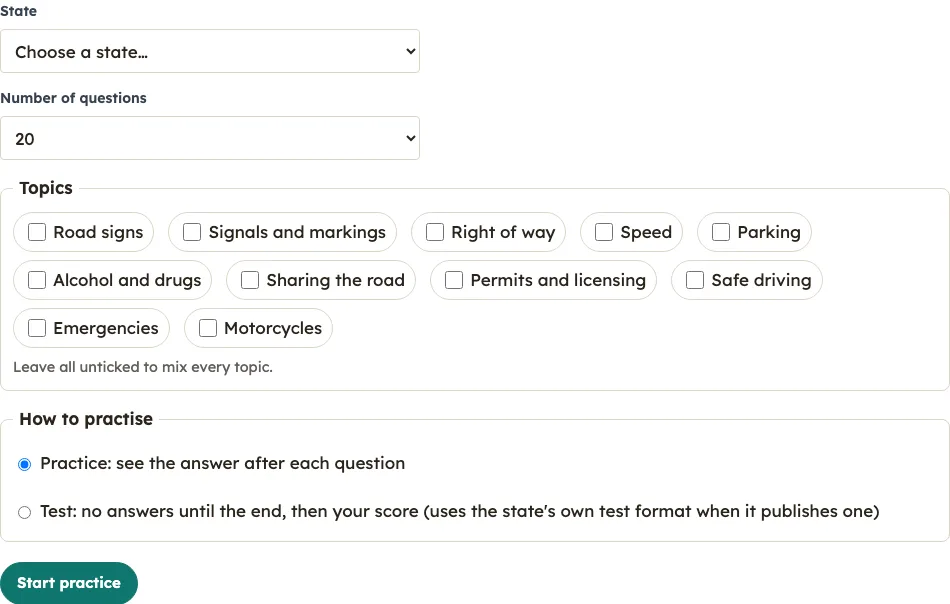
- Choose your state first. Speed limits, alcohol limits and parking distances differ by state, so the questions you get depend on this choice.
- Pick how many questions you want: 10, 20, 30, 40 or all.
- Tick the topics you want to practise. If you leave every topic box empty, the quiz includes all topics.
- Choose Practice or Test.
- Select an answer. On a keyboard, keys 1 to 4 pick an answer. On a phone, tap the large buttons. The answer options shuffle every time, so the correct answer is never in a fixed spot.
- In Practice mode, each answer is checked straight away. You see whether you were right, the correct answer, a short explanation and a link to the handbook section. In Test mode, nothing shows until the end, and the Back button lets you change an answer before you finish.
- Read the result screen. It shows your score as X of N right, with a pass or fail line when your state publishes a pass mark, followed by your topics from weakest to strongest, the time taken and every missed question.
- Use the buttons below the result: New set of questions, Retry the ones I missed, Change settings, Print results or My progress.
What topics are on a driver’s ed test?
When people say driver’s ed test, they most often mean the permit knowledge test. It covers 12 topics: safe driving, permits and licensing, road signs, sharing the road, right of way, alcohol and drugs, signals and markings, speed, parking, emergencies, other and motorcycles. Each state’s handbook sets the exact rules within those topics.
The table shows how many practice questions this tool holds for each topic across its 9 state banks.
| Topic | Practice questions (9 state banks) |
|---|---|
| Safe driving | 326 |
| Permits and licensing | 262 |
| Road signs | 143 |
| Sharing the road | 132 |
| Right of way | 127 |
| Alcohol and drugs | 120 |
| Signals and markings | 117 |
| Speed | 106 |
| Parking | 103 |
| Emergencies | 77 |
| Other | 39 |
| Motorcycles | 16 |
On a state’s page, Test mode uses that state’s published number of questions when its official page gives one, balanced across topics. When a state publishes no count, Test mode uses the number you chose in the setup.
How do I study by topic?
Tick one topic box in the setup, choose Practice, and work through questions until you can explain the rule behind each answer. After each set, the result screen lists your topics from weakest to strongest, so the top topic is the next one to drill. Repeat this until your weakest topic moves down the list.
- Choose your state, because the rules you are studying depend on it.
- Tick a single topic, such as speed, and pick a question count of 10 or 20.
- Stay in Practice mode so each answer is explained as you go.
- Open the handbook link for every question you miss, not only the ones you find confusing.
- Check the topic breakdown on the result screen, then tick the weakest topic for your next set.
- Finish with a Test mode run across all topics, so you practise switching between subjects the way the real test does.
Frequently asked questions
Which topic do most people miss?
This tool does not publish data on which topic most people miss, so it cannot give you that answer. Your own result screen ranks your topics from weakest to strongest, which shows where you miss the most questions.
Is a driver’s ed test the same as the permit test?
Often, yes. The phrase can mean the permit knowledge test, a course exam or a final exam. This tool covers state handbook questions, which is the study material for the permit knowledge test. A course’s own exam is set by the school.
Does this tool have a time limit?
No. There is no countdown timer or time limit in any mode. The result screen shows only how long you took.
Why do the same questions keep coming back?
A question you miss stays on your missed list until you answer it correctly two times in a row. Your next normal quiz and any “Review my N missed questions” run put those questions first. Use My progress to clear the saved list if you want a fresh start.
Are these the real test questions?
No. Permitnook wrote these practice questions from the official handbook, so they cover the same material without copying the actual exam.
Where is my score stored?
Your scores, answers and missed questions stay in your browser’s local storage. They are never sent to the site, and the My progress page can delete them.
Related tools
- Permit practice test for a general permit-style quiz you can use alongside this one.
- DMV practice test by state when you want to compare state-by-state practice sets.
- Right of way test when right of way is your weakest topic on the result screen.
- Road signs test when you need focused practice on signs and their meanings.
- DMV written test in exam mode when you want a closer run at test conditions.
- My progress to review or delete the scores and missed questions saved in your browser.